
This guide walks you step by step through getting started with Yapla Newsletters, from activating the feature to analyzing your first campaign. Each step links to the article that explains it in detail.
In this article:
- Before you start: authentication and access
- Choose your plan
- Set up your sender and brand
- Prepare your contacts
- Create your first campaign
- Test before sending
- Send and track your results
- Learn more
How does Yapla Newsletters work?
Yapla Newsletters is the bulk email tool built into Yapla. It opens in a separate space from your Yapla account, but the two are connected: your Yapla contacts (members, donors, participants) are synchronized automatically and sorted into lists by language. You create your campaigns, segments and subscription forms there, then track the statistics of each send.
Before you start, you may want to browse the technical vocabulary of Yapla Newsletters (list, segment, tag, bounce, etc.).
Before you start: authentication and access
Important: you can only send newsletters once your Yapla account authentication is complete, even if you don't collect online payments. See how to authenticate your Yapla Wallet and why this step is required.
To open Yapla Newsletters, click Newsletters in your Yapla account menu, then Access Yapla Newsletters. The tool opens on its Dashboard, which summarizes your latest sends and the growth of your audience.
Choose your plan
The price of Yapla Newsletters depends on the number of contacts in your audience and on the plan you choose.
- In the left-hand menu, go to Settings > Plans & Billing.
- In Calculate your price for, choose the number of contacts that matches your audience.
- Compare the plans (Premium, Growth or Free) using the tabs, then click Upgrade under the plan you want.
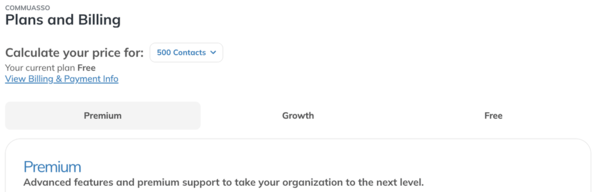
The number of contacts is calculated per list. A contact who is in two lists (for example a French list and an English list) therefore counts twice.
Set up your sender and brand
A recognizable sender name and address builds trust with your recipients and improves the deliverability of your emails.
- Sender and domain: under Settings > Senders and Settings > Domains, add your organization's address and authenticate your domain. Add a custom domain for your newsletters
- Brand: under Settings > Brand Kit, save your logo, colours and fonts. Smart templates apply them automatically. Using Templates for a Newsletter Campaign
Prepare your contacts
The contacts in your Yapla account are synchronized automatically with Yapla Newsletters. You'll find them under Audience > Contacts, split into one list per language.
- Automatic contact sync to Yapla Newsletters: what information is synchronized and how lists work.
- Creating segments for your newsletters and use tags to target a specific group (active members, donors, event participants).
- Create a segment for your active members in Newsletters
Coming from another newsletter tool? Import your contacts, then unsubscribe those who had unsubscribed or whose address bounced with your previous provider.
- Importing contacts to Yapla Newsletters
- Import external contact groups to Yapla Newsletters
- Unsubscribing imported contact groups
Want to recruit new subscribers? Publish a subscription form on your website and let your contacts choose the topics they're interested in.
- Create and embed a subscription form into your newsletter
- Allow my contacts to subscribe to my newsletters based on their interests
Only import contacts who have agreed to receive your communications. Sending to addresses that haven't consented increases complaints and bounces, which can hurt the deliverability of all your sends.
Create your first campaign
- Go to Campaigns > Emails, then click the (+) button in the top right corner.
- Choose your starting point: Yapla templates, Professional templates, My templates, a campaign you already sent (Sent campaigns), a seasonal template (Calendar) or a blank page (Start from scratch).
- Edit the content in the editor, choose the recipient list or segment, then fill in the subject and sender.
Professional templates: available with the Yapla Newsletters Growth plan.

To enrich your content:
- Using Templates for a Newsletter Campaign
- Add Yapla content to your newsletter campaigns (events, donation or membership campaigns)
- Adding Anchor Links to Email Content with HTML
- Create and Share a Newsletter URL
Test before sending
Before each send, send yourself a test and check:
- how it looks on desktop, on mobile and in dark mode;
- links, images and alternative text;
- the subject, the sender name and the recipient list or segment;
- the send date and time, if you schedule the campaign.
Testing a Newsletter Campaign: Best Practices
Send and track your results
Once the campaign is sent, click View Report in Campaigns > Emails to see the open rate, click rate, unsubscribes and bounces.
Learn more
Our webinars go deeper into each step:
- Webinar | Newsletters: email design and content basics
- Webinar | Newsletters: build your contact lists
- Webinar | Newsletters: analyze your email performance
- Webinar | Newsletters: automate event promotion
If you have any questions, our support team can be reached at support@yapla.com.
Why is account authentication required?
Activating your Yapla account (often tied to setting up the Yapla Wallet) requires you to submit information and supporting documents. Even if you don't collect online payments, this step is mandatory to send newsletters.
Sending bulk email (newsletters, membership campaigns, etc.) is a strictly regulated activity. We must therefore verify the identity of every organization that uses our servers, for three reasons.
1. Protect against spam and malicious activity
Identifying the people responsible for the organization is our first line of defence against the platform being used to send unwanted or fraudulent emails. By verifying each account, we protect the whole Yapla community.
2. Ensure better deliverability
The reputation of our sending servers is valuable. If an unidentified sender used Yapla for malicious purposes, email providers (Gmail, Outlook, etc.) could block every message coming from Yapla. By authenticating your account, you help keep our servers' reputation strong and help your own messages reach your members' inboxes.
3. Keep the service free and secure
This rigour allows us to keep offering a free, high-quality and secure service to all organizations, in line with current digital security standards.