
An active member in Yapla is a member whose membership has been approved, either automatically or manually by the administrator. This means the member enjoys all the benefits of their membership, such as access to preferential rates, a listing in the directory and access to members-only pages. It is useful to create a segment containing all your active members in Yapla Newsletters so your newsletter campaigns automatically target the members who are currently involved in your community.
Identify active members in Yapla Newsletters
To identify active members in Yapla Newsletters, go to Audience > Contacts. In your contact list, all your active members in Yapla automatically have the “membres-actifs” tag in the Tags column.
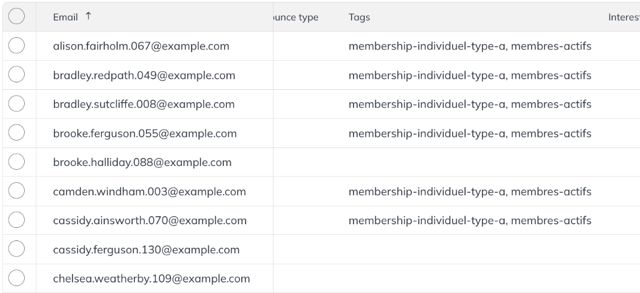
Contacts whose status is Active in the Status column of Yapla Newsletters are not necessarily active members in Yapla. This status only reflects their activity in relation to your newsletter campaigns. To learn more about contact statuses in Yapla Newsletters, see this article.
Create a segment to group active Yapla members
Under the contact list you want, click Create segment in the left-hand column. Give your segment a title, ideally “Active members”. Under Conditions, select “Tags” in the first row, “Has” in the second and “membres-actifs” in the last.
Click Save and exit.
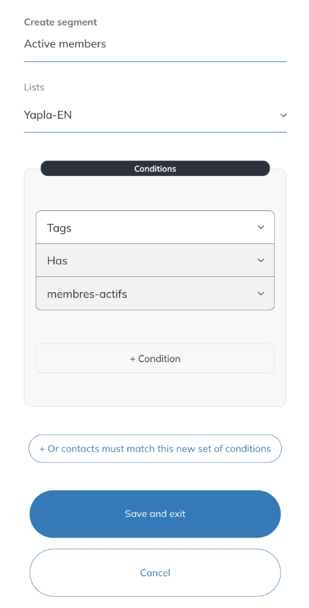
All your active members in Yapla are now added to the Active members segment, and new active members in Yapla will also be added to the segment automatically.