
Are you moving your contacts from another email tool, or did you receive unsubscribe requests through another channel? Instead of unsubscribing your contacts one by one, import their email addresses with the Unsubscribed status: Yapla Newsletters updates their status in a single operation.
The import changes the status of every contact in the file. Check the target list and the selected status before starting: a mistake can unsubscribe an entire list. A contact unsubscribed by mistake can be resubscribed one at a time (see Resubscribe a contact); to resubscribe contacts in bulk, contact support at support@yapla.com.
In this article
- Prepare the file
- Import contacts with the Unsubscribed status
- If the import gets stuck
- Unsubscribe your former bounces
- Unsubscribe a few contacts from the list
- Effect on your billed contact count
Prepare the file
The file contains a single column: the email addresses of the contacts to unsubscribe, with the email header. Remove all other columns (name, groups, attributes): with several columns, the import slows down considerably and may never finish.
Start with a test on two or three addresses. Check that their status changes to Unsubscribed, then import the full file.
Import contacts with the Unsubscribed status
- In Yapla Newsletters, go to Audience > Contacts. If you have several lists, select the target list in the left column.
- Click the (+) in the top right corner, then Import contacts.
- Select the Existing option, choose the target list, then click Continue. Never use the Add new option: it creates another list, and your contacts would be counted a second time.
- Select Copy/paste from spreadsheet and paste the column of addresses, or click Browse for a file to upload to import a CSV file. Click Continue.
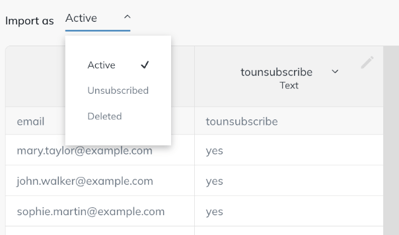
- Check that the column is named "email".
- In the Import as menu, select Unsubscribed, then click Continue.
- Confirm the permission by selecting I confirm I have full permission, then click Continue. You then return to your contact list.
Repeat the operation for each of your lists. For example, if you send bilingual newsletters, unsubscribe the contacts in the list for each language.
If the import gets stuck
An import of a few thousand addresses normally takes a few seconds. If the page freezes:
- clear your browser cache, then reload the page;
- check that the file only contains the column of addresses;
- if the import still fails, contact support at support@yapla.com and attach a sample of the list to unsubscribe.
Unsubscribe your former bounces
Your former bounces, exported from your previous tool, follow the same method. During the import, some of these addresses may be rejected automatically because they are recognized as invalid: these contacts are then not added. The others receive the Unsubscribed status.
To block all sending to an address, whatever the list, add it to the suppression list instead. See the article Manage the Yapla Newsletters suppression list.
Unsubscribe a few contacts from the list
For just a few contacts, there is no need to import a file. Under Audience > Contacts, check the contacts concerned (Select page checks all the contacts on the displayed page), click Actions at the bottom of the list, then Unsubscribe.
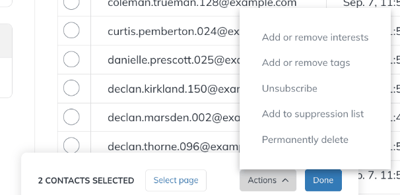
The action only applies to the contacts on the displayed page. If your selection spans several pages, repeat the operation for each one.
Effect on your billed contact count
An unsubscribed contact leaves the list immediately. The total number of contacts used for billing, however, is only updated at the start of the next billing cycle.