
Payouts from Yapla to your bank account are made twice a month, on the 15th and 31st of each month.
It takes three to four days for Yapla payouts to appear in your bank account, depending on the institution. The entry on your bank statements will appear as Direct Deposit/ YAPLA or Direct Deposit/ STRIPE.
View your payout history in Payments > Transfers. You can find all payments, their potential commissions, and any included refunds by selecting a specific payout.
Here are the possible statuses:
-
Success: The transfer was successful and the funds have been sent to the bank account.
-
Pending: The transfer is being processed. The funds are in transit to your bank account (usually within 2 to 3 business days).
-
Error: The transfer could not be completed. Please check your bank details or contact support if needed.
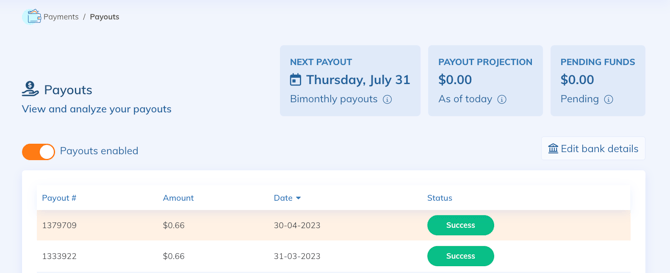
Starting with the Essential plan, you can enable or disable payouts as needed. This can be done to maintain sufficient available funds for potential refunds or to comply with specific business rules.
Balances and Pending Funds
Two types of balances are shown in the details: the total balance (visible on the dashboard) and the available balance (visible in Payments > Payouts), the latter being transferred twice a month.
- The total balance corresponds to the sum of all recorded transactions that have not yet been paid out to your account.
- The available balance includes only transactions completed more than seven days ago, minus any refunds. Each transaction is held for a minimum period of seven days before becoming eligible for payout.
- Pending funds represent the total of transactions frozen for seven days. This balance will eventually be added to the available balance after the escrow period.
Example
A transaction made on September 5th will not be available for a transfer on September 10th, as it was made less than seven days prior. On September 12th, it will become eligible for payout. Note that seven full days from the date and time of payment must be considered.
Refunds
A refund has an immediate impact on both your balance and your available balance. It reduces the amount of your available balance. If the amount of your refunds exceeds your available balance, the payout will be postponed to the next period once an available balance is reached.
Download Transfer Details
On the payout detail page, you can download a document listing all transactions included in the transfer. The document contains invoice information (last name, first name, email, and client organization) for each payment, as well as the associated amounts (commission fees and purchase amount).
See the list of available reports for the Accounting feature.
FAQ
What are the possible reasons why my balance hasn't been transferred to my bank account?
If you notice that no payout has been made to your account, several reasons may explain it:
- Electronic wallet authentication is not complete Your identification file must be validated for transfers to be authorized. Ensure that all required documents have been provided and validated. Authenticate your electronic wallet.
- A refund was issued and exceeds the balance eligible for payout In this case, even if payments were received, the refund (or refunds) absorbed all or part of the balance, preventing a payout.