
To edit your profile, click on your name in the upper right corner and select "My Profile" from the drop-down menu.
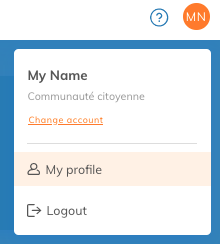
You will then be able to modify the following information:
-
First name - Your first name
-
Name - Your name
-
Email - The email address used to log in and to receive communications. This address cannot be changed*.
- Phone number - Your phone number
- Photo - your photo or avatar. This will be displayed in the top right corner of your Yapla account.
-
Default language - The language in which Yapla is displayed.
-
Time Zone - Your time zone. Used to display the creation/modification times in different applications.
-
Default Account - If you have more than one account, the account that will be active when you log in.
-
Password - To change the password used to log in to Yapla
* Although it is not possible to change your email address, you can change your address by adding a new user with the new address and then disabling the user with the old address.