
Yapla helps you save time by automatically synchronizing your contacts with your newsletters. So there's no need to update your newsletters contacts list.
Although the Contacts feature is available in the Essential plan, Yapla Newsletter users on the free plan will still have their Yapla contacts synchronized to Yapla Newsletter. However, access to the Yapla Contacts feature and group management will not be possible.
How does synchronization work?
To take advantage of the automatic update of your recipients, your Yapla contacts are synchronized automatically.
You can deactivate automatic synchronization of contacts. See our online help article on this subject.
Synchronized data and mailing lists
When a contact is added to your list, all the data contained in the native fields list of the Contacts application is automatically added to the synchronization option. You can find the list of these fields in the Contacts > Settings > Forms > Fields tab, in the Native field ou Custom field list section.
If a contact is updated in a Yapla feature (e.g., the first name is modified in the member profile file), the information is also updated in the recipient profile during synchronization.
Good to know
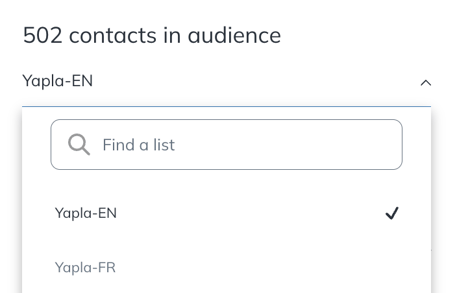
When your contacts are synchronized, one or more lists will be automatically created in your Yapla Newsletters account. You will find lists associated with the active languages on your Yapla account.
Thus, if you have more than one list (for example FR and EN), each contact will be associated with a list according to their preferred language in their profile. Otherwise, only one list (language) will be created.
We do not recommend creating additional lists to organize your contacts, but rather creating tags and segments. You will therefore avoid duplicate contacts and will be able to take full advantage of the maximum number of contacts available in your offer.
If you notice that the automatic synchronization between your contact database and Yapla Newsletters is no longer effective or that data is missing, go to Configuration > Features > External Software and click on Repair in the Yapla Newsletters line.
To go further
Use Yapla groups to create segments for your campaigns. Learn how in this article.